2.16 & 2.17

Meet the improved product Sidebar

Designed to help you complete your products faster and more intuitively. Instantly navigate through your product by selecting workflow tasks or missing information. The new Sidebar makes it easier to understand your product, quicker to move between sections, and simpler to reach completion.
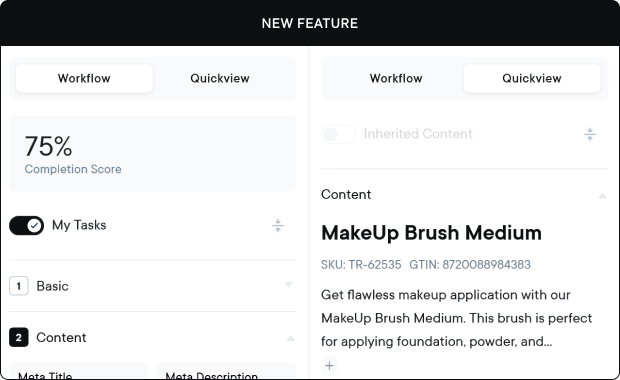
  • Product completion score: See progress at a glance in percentage.
  • Adjustable layout: Compact mode and maximum width can be resized by dragging.
  • Quick access to tasks: Jump straight to workflow tasks or missing info with a single click.
  • Enhanced product visibility: Relevant product data is now available directly in the quickview to assist you while editing.

Note: The new sidebar is currently in beta and can be enabled via a setting. We plan to roll out the final version soon. Contact support if you’d like early access.
Simple category mapping in product editing

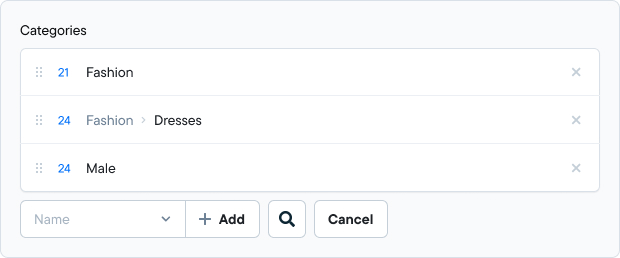
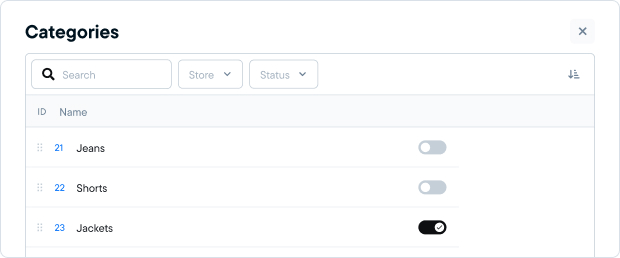
Working with categories is now faster, clearer, and more flexible when editing products.

  • Users can now experience our new slide-out panel to have a better overview and better search possibilities within the product category page
  • Drag & drop support to define category display order

API update: filter products by last update date

For users working with the API v2, it’s now possible to filter products based on when they were last updated.
• New filters available on the Products API (v2):
UpdatedOnUtcRange.From
UpdatedOnUtcRange.To

• Enables more precise syncing and incremental updates

Updates and improvements

  • The notification “image saved” is now again correctly displayed when you click “save.”
  • On the product – associated product page the display order is now again correctly saved and remains unchanged after saving and refreshing.

Receive our release updates straight to your inbox

© KatanaPIM
DisclaimerSitemap